How can I reduce failed deliveries when the customer isn’t home?
Updated
Short answer
Tell the customer when you are coming before the driver leaves, let them change the instructions or the day themselves, and make every failed attempt end with a reason and a next step. In DayRoute each customer gets a time window when you send the routes and a tracking page where they can add a gate code or ask to leave it at the door. When nobody is home, the driver picks one of your failure reasons, the customer is asked to pick another day, and that day waits for a dispatcher to approve it.
Not the right tool if you want to redirect parcels to lockers or pickup points: there are none, and every attempt goes to the order’s address.
How it works in DayRoute
Before the driver leaves: a window the customer can plan around
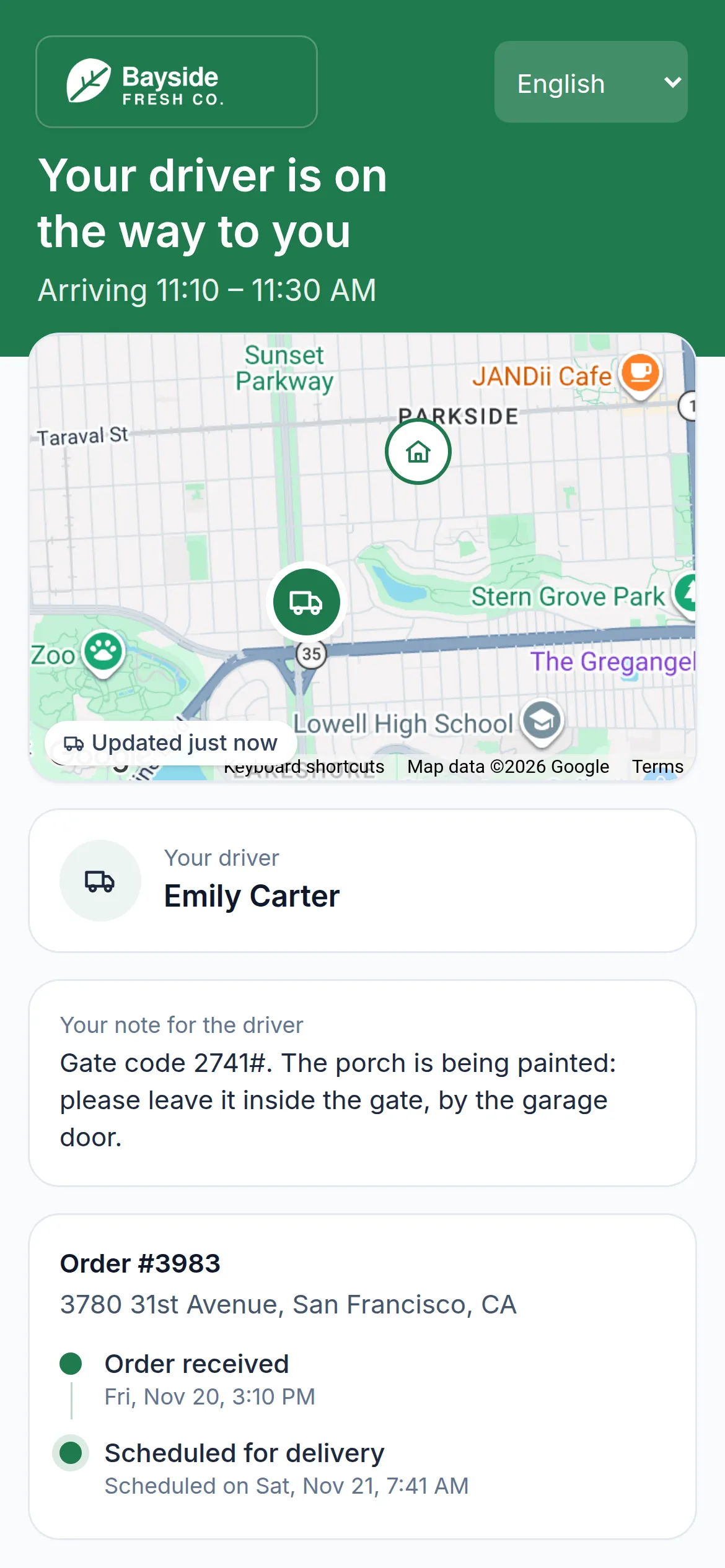
When you send the routes, each customer is told a time window. For a later day, a message written during your quiet hours (9 PM to 8 AM by default) waits until they end, and the customer hears a new time only when the live ETA moves by more than you allow. Each order’s tracking page shows the same window, then the driver on the map once the driver is heading to that customer.
- Email included; SMS through your own Twilio account; WhatsApp through your own WhatsApp Business account
- Messages in English, Spanish, Vietnamese or Swedish, in your own wording
- An “on the way” message when the driver sets off to that customer
- Customers add delivery instructions, a gate code or “leave it at the door” until the driver is on the way; an order that needs a signature can’t be left at the door
When nobody is home: a reason, proof and a way forward
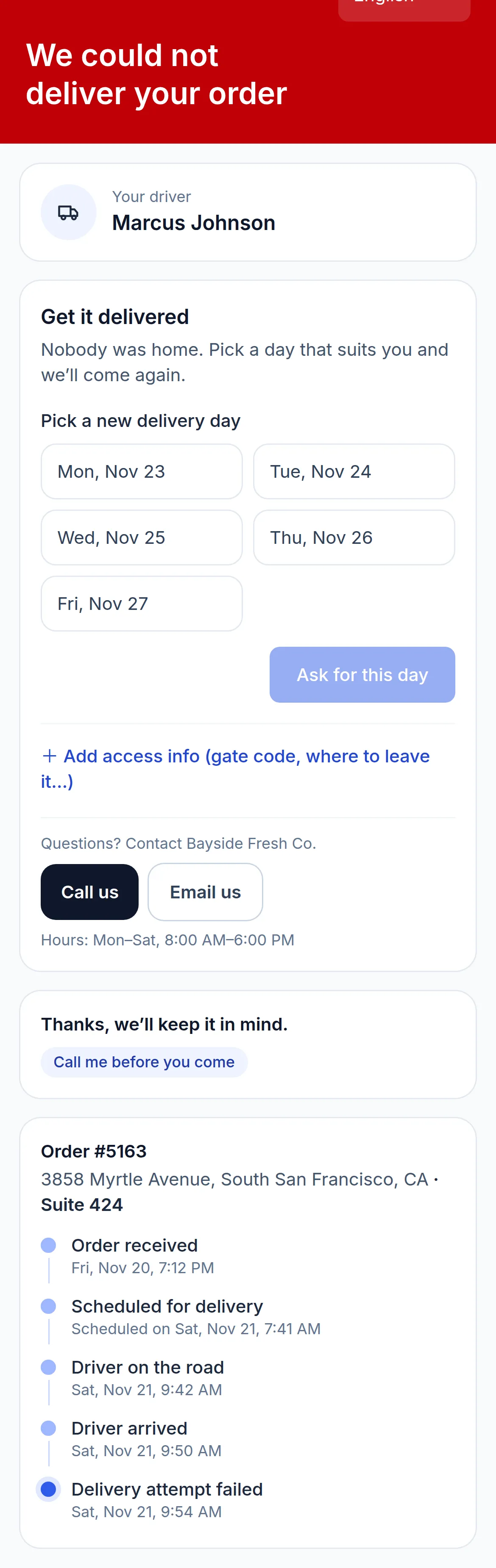
The driver picks one of your own failure reasons, and you choose the reasons that need a photo. The route’s GPS shows whether the driver stopped at the address: neutral information for your team, never a verdict. The customer’s message follows the reason: nobody home asks them to pick another day, no access asks for a gate code, a wrong address asks them to check the pin. The tracking page shows the same under “Get it delivered”, with your support contact.
The next attempt, on a day that works
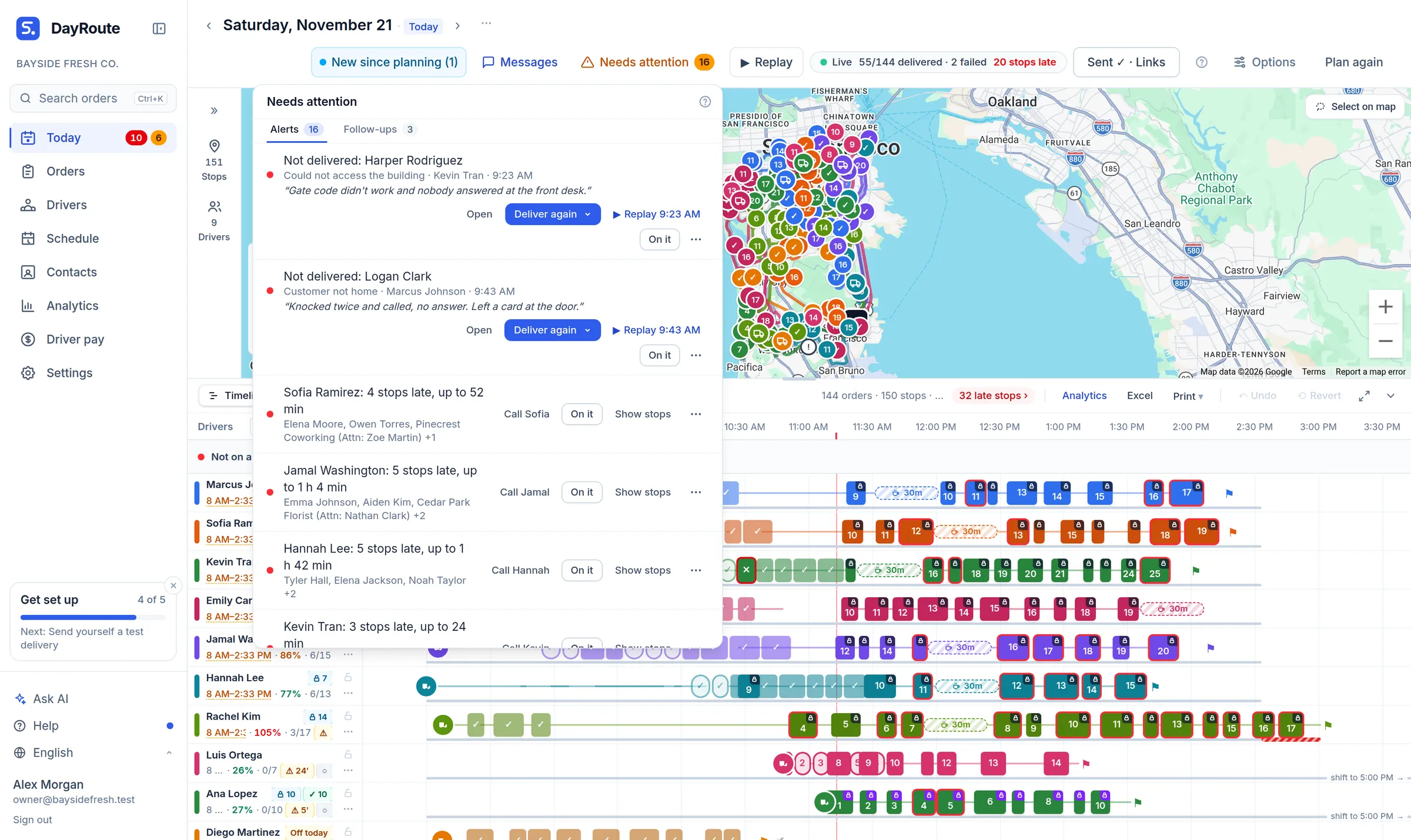
A failed delivery lands in Needs attention with the driver’s reason. Deliver again puts it on today’s routes or on another day. A day the customer picks waits there for a dispatcher to approve it; when the order is on a route already sent, it waits on hold until you click Send updates.
- One tracking link for every attempt: the page says “Attempt 2”
- The next attempt keeps the customer’s note, the gate code and “leave it at the door”, and the driver sees why the last one failed
- When a driver’s day ends before their stop, the customer hears “We couldn’t get to you today” and can pick another day
See what failed deliveries cost you
The Cost per stop card in Analytics shows what failed attempts cost, and what the deliveries made again afterwards cost, at the cost per hour and per mile you set. Next to it, Analytics tracks time windows kept and ETA accuracy per team and driver, so you can see whether the windows you promise are the ones your drivers keep. Try it on your own orders free for one month, no credit card.
Try it in the live demo
A fictional delivery company in the middle of its day. Read-only, no sign-up.
Open the live demo →Feature
Customer tracking
Keep customers informed with a live tracking page, SMS through your own Twilio account, email and WhatsApp: live ETAs, rescheduling and ratings, branded as you.
6 steps · 5 min read
Customer notifications and the tracking page
Frequently asked questions
Can customers pick another day themselves?
Yes, after a failed attempt or a day the driver didn’t reach them, on the tracking page under “Get it delivered”, when you allow it in Settings (on by default). The day they pick waits for a dispatcher to approve it.
Is SMS included?
Email is included. SMS goes through your own Twilio account and WhatsApp through your own WhatsApp Business account, so you pay those providers directly.
Can the customer ask us to leave it at the door?
Yes, on the tracking page until the driver is on the way, unless the order needs a signature. By default, the driver then takes a photo of where it was left.
Does the customer get a new link for the second attempt?
No. Every attempt keeps the same tracking link, and the page always shows the newest attempt.
More answers
Cut the second trip to the same door
Time windows, tracking pages and a way forward after every failed attempt, on a 1-month free trial, no credit card.
Want a walkthrough with us? Book a demo